Allow partial websites/specific YouTube videos - Console
 Updated 2 weeks ago
by
admin
Updated 2 weeks ago
by
admin
Allow specific YouTube videos.
In some instances, you might want to block access to YouTube as a whole but allow partial access to specific videos. This article will guide you through the process.
Example Scenario
Let's take an example of wanting to block youtube.com but allow specific videos such as this video https://www.youtube.com/watch?v=Ncf23ZiUK6I
- Firstly, we check the website using the browser Development Tools to make sure we have all the necessary URLs
In general, YouTube uses these three URLs:
youtube.com (main URL)
ytimg.com (Content Server)
googlevideo.com (Video Player)
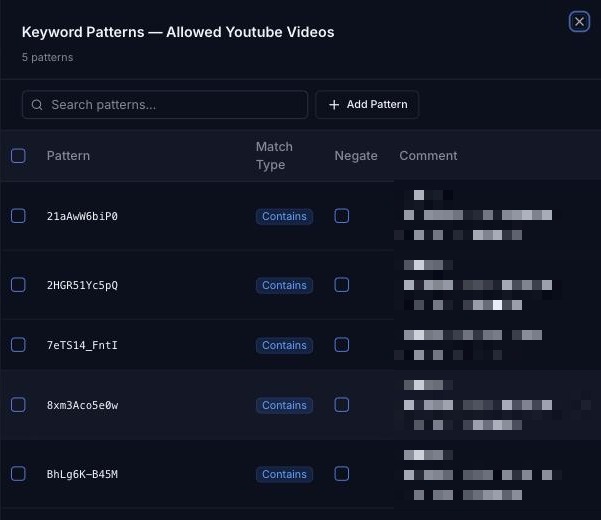
- Secondly, create a Keyword Category (Browse ⟶ Categories ⟶ Keywords) to use in a rule
Set Content Match to URL, then add a pattern (Match Type Contains) for each alpha-numeric video ID you want to allow:
googlevideo.com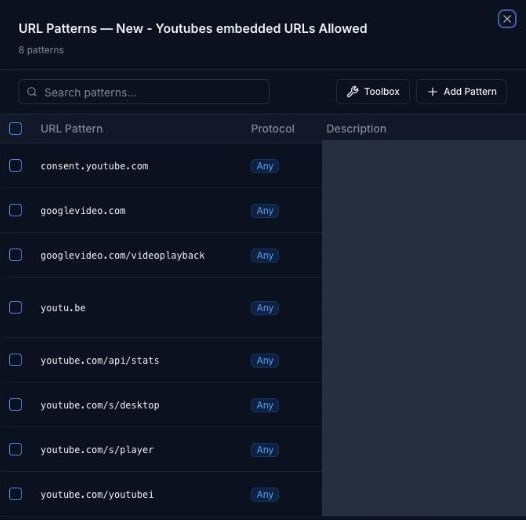
googlevideo.com
/s/desktop
/s/player
/s/_/ytmainappweb
- Next, create rules in Browse ⟶ Rule Builder to enforce the required logic
Create the following two rules. The first (executes first) one allows the URLs we set in the Keyword Lists, whilst the one below it (executes second) blocks everything else.
Each rule is shown below:
The first rule (final action Allow) has a Keyword Category match set to your YouTube keyword category. Any additional conditions are up to you.

The second rule (block) blocks the general associated Web Category Streaming & Downloadable Video or the main YouTube URL (depending on your preference), using a Web Category or Custom URL match with a Block action.
The result should be that access to the website is blocked unless the specific keyword string is contained in the URL.